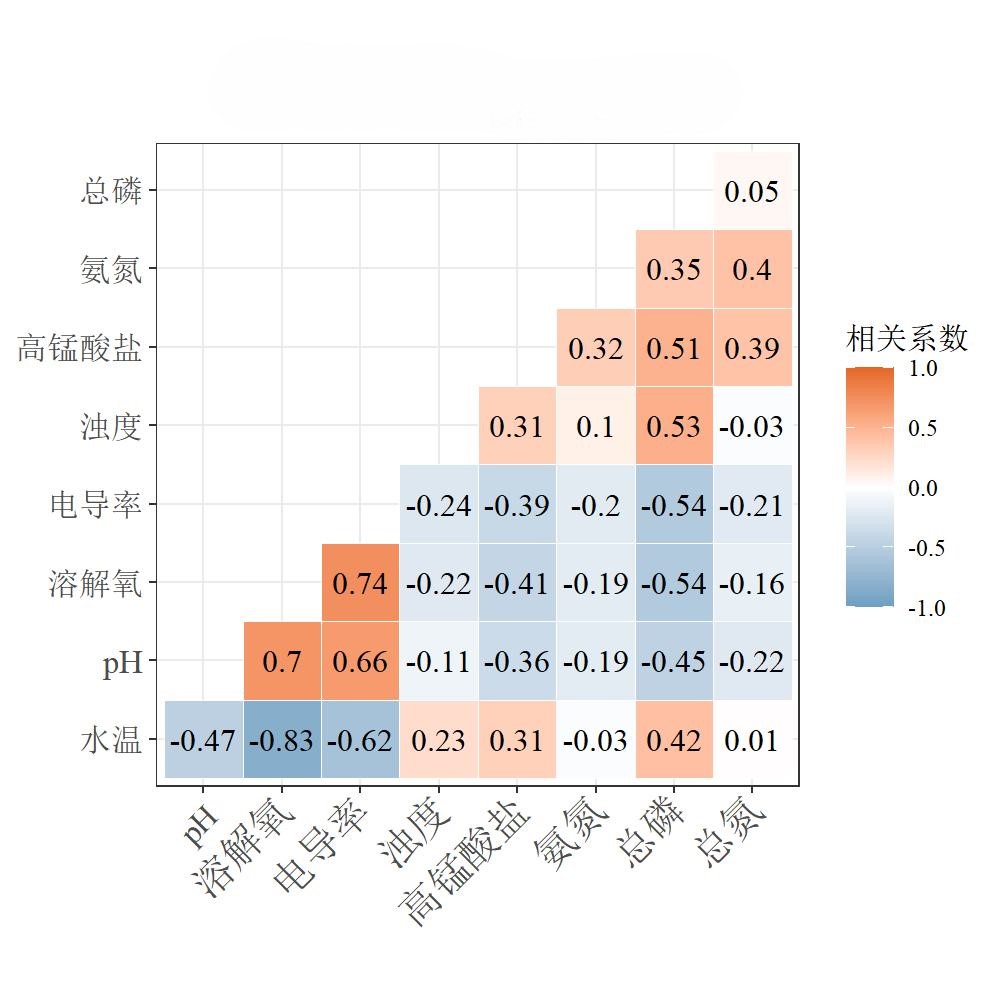
1
2
3
4
5
6
7
8
9
10
11
12
13
14
15
16
17
18
19
20
21
22
23
24
25
26
27
28
29
30
31
32
33
34
35
36
37
38
39
40
41
|
data1<-read.table('E:\\\数据\\all.txt',sep = "\t",encoding="UTF-8",header = T)
data_cut<-data1[,12:20]
data_cut<- na.omit(data_cut)
str(data_cut)
cordata <- round(cor(data_cut),3)
library(ggcorrplot)
p<-ggcorrplot(cordata,
title=paste0("XX参数相关性"),
method = c("square"),
type=c("lower"),
hc.order = FALSE,
outline.col ="white",
ggtheme = theme_bw()+theme(plot.title = element_text(hjust = 0.5, size = 16,family="serif")),
show.legend=TRUE,
legend.title = "相关系数",
colors = c("#6D9EC1","white","#E46726"),
lab = TRUE,
lab_size = 4)
p
setwd("E:\\output\\相关性图")
jpeg(filename =paste0("output.jpg"),width=1000,height=1000,res=150,family ="serif" )
p
dev.off()
|